
Wedding DJ Setup Guide
-
 Jun 23, 2026
 -
 By
Learn How To Be a DJ
By
Learn How To Be a DJ -
 How To Be a DJ
 -
 7 min read
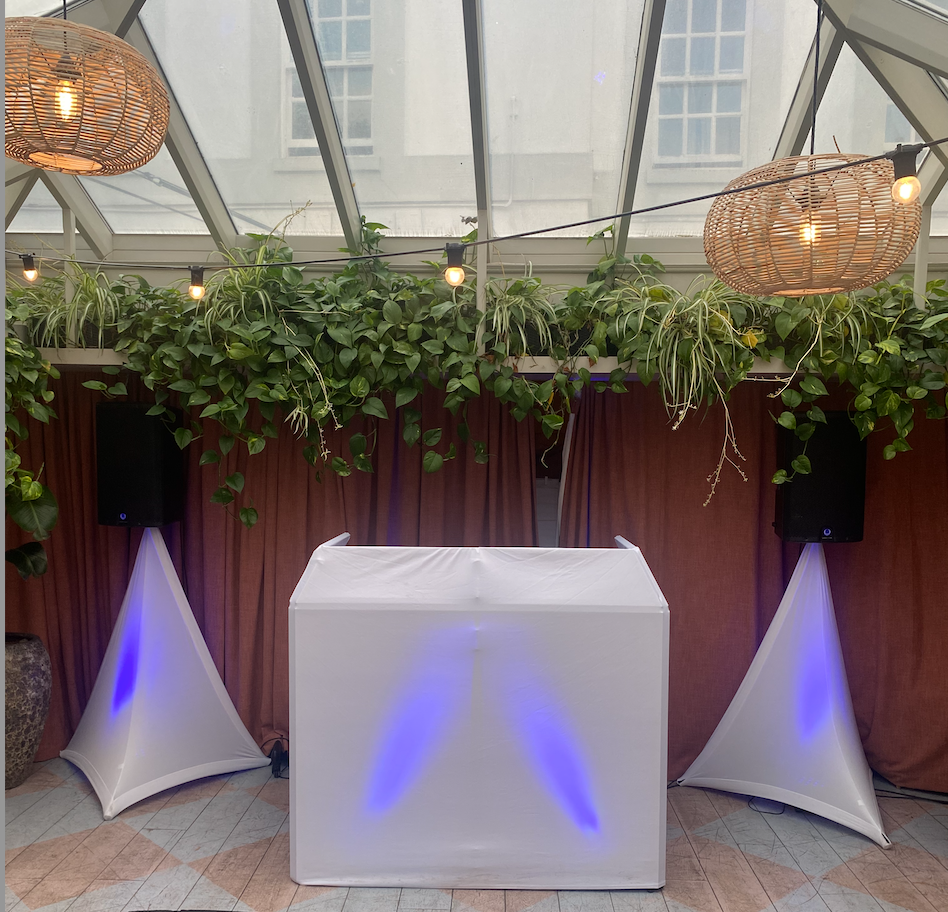
Wedding DJ Setup Guide: Everything You Need for a Successful Wedding Gig
If you have recently landed your first wedding booking, congratulations. Wedding DJ work can be one of the most rewarding and profitable areas of DJing. However, it can also be one of the most demanding.
Unlike club gigs, weddings often involve multiple generations, formal announcements, emotional moments and high expectations from the bride and groom.
That is why having a proper Wedding DJ Setup Guide is essential.
In this guide, you will learn exactly what equipment you need, how to set it up, how to prepare for the event and how to avoid the mistakes that catch many beginner DJs off guard.
Whether you are a complete beginner or an experienced club DJ moving into weddings, this guide will help you create a professional setup that keeps the dancefloor full and your clients happy.
Quick Answer
A professional wedding DJ setup typically includes:
| Equipment | Purpose |
|---|---|
| DJ Controller | Music mixing |
| Laptop | DJ software |
| PA Speakers | Sound for guests |
| Microphones | Announcements and speeches |
| Lighting | Dancefloor atmosphere |
| Speaker Stands | Better sound coverage |
| Cables | Connectivity |
| Backup Music Source | Emergency protection |
| Power Extensions | Reliable power |
| Booth Setup | Professional appearance |
The best wedding DJ setup balances sound quality, reliability, professionalism and ease of transport.
Why Is a Professional Wedding DJ Setup Important?
A wedding only happens once.
There are no second chances.
If your equipment fails during the first dance or your microphone stops working during speeches, the impact can be significant.
A professional setup helps ensure:
- Reliable performance
- Better sound quality
- Professional appearance
- Easier event management
- Greater client confidence
- More referrals and bookings
Many couples judge a DJ within seconds of seeing their setup.
A tidy, organised and professional-looking rig immediately builds trust.
What Equipment Do You Need for a Wedding DJ Setup?
DJ Controller
Your controller acts as the centre of your setup.
Popular options include:
Pioneer DJ DDJ-FLX4
Perfect for beginners.
Advantages:
- Affordable
- Easy to learn
- Rekordbox compatible
- Portable
Pioneer DJ DDJ-FLX10
Popular among professional mobile DJs.
Advantages:
- Professional features
- Excellent sound quality
- Multiple outputs
- Advanced performance functions
Denon DJ Prime 4+
Ideal for DJs wanting standalone performance.
Advantages:
- No laptop required
- Touchscreen workflow
- Professional reliability
Laptop
Most wedding DJs use a laptop running:
- Rekordbox
- Serato DJ Pro
- VirtualDJ
- Engine DJ
Always optimise your laptop before events.
Remove unnecessary software.
Disable updates.
Close background applications.
Carry your charger.
Speakers
Your speakers determine how guests experience your music.
Active Speakers
Recommended for most beginners.
Benefits:
- Built-in amplifiers
- Faster setup
- Fewer cables
- Easier transportation
Popular choices include:
- Pioneer DJ XPRS Series
- RCF ART Series
- Electro-Voice ZLX Series
- QSC K Series
Subwoofers
A subwoofer provides low-end bass.
For weddings with:
- 100+ guests
- Large venues
- Dance music focus
A subwoofer can significantly improve the overall experience.
However, smaller weddings may not require one.
Microphones
Every wedding DJ should carry at least two microphones.
Wireless Microphone
Ideal for:
- Speeches
- Toasts
- Introductions
Backup Wired Microphone
Always have one available.
Batteries fail.
Wireless systems can experience interference.
Backups save weddings.
Lighting
Lighting transforms a room.
Basic wedding lighting may include:
Wash Lights
Used to colour walls.
Moving Heads
Create dynamic effects.
Dancefloor Lighting
Adds energy during party time.
Uplighting
Popular for elegant wedding venues.
Step by Step Wedding DJ Setup Process
Step 1: Arrive Early
Aim to arrive:
- 90 to 120 minutes before guests
This gives plenty of time for:
- Unloading
- Setup
- Testing
- Troubleshooting
Step 2: Position Your DJ Booth
Consider:
- Guest visibility
- Dancefloor location
- Power access
- Safety
Avoid blocking exits.
Avoid creating cable hazards.
Step 3: Set Up Speakers
Place speakers:
- Above head height
- On stands
- Slightly forward of microphones
This reduces feedback.
Step 4: Connect Equipment
Typical signal chain:
Laptop → Controller → Speakers
Test every connection.
Secure loose cables.
Use cable covers where necessary.
Step 5: Set Up Lighting
Position lights:
- Away from guest traffic
- Securely mounted
- Properly powered
Check venue restrictions first.
Some venues limit lighting effects.
Step 6: Sound Check
Play several music genres.
Walk around the room.
Check:
- Volume
- Clarity
- Bass response
- Feedback issues
Step 7: Test Microphones
Test:
- Speech volume
- Wireless range
- Battery levels
Never assume a microphone works without checking.
Wedding DJ Setup Example
Small Wedding (Up to 80 Guests)
| Equipment | Quantity |
|---|---|
| Controller | 1 |
| Laptop | 1 |
| Speakers | 2 |
| Microphones | 2 |
| Light Bar | 1 |
Approximate Investment:
£1,000 to £3,000
Medium Wedding (80–150 Guests)
| Equipment | Quantity |
|---|---|
| Controller | 1 |
| Laptop | 1 |
| Speakers | 2 |
| Subwoofer | 1 |
| Microphones | 2 |
| Lighting Fixtures | 4-8 |
Approximate Investment:
£3,000 to £7,000
Large Wedding (150+ Guests)
| Equipment | Quantity |
|---|---|
| Controller | 1 |
| Laptop | 1 |
| Speakers | 4 |
| Subwoofers | 2 |
| Wireless Microphones | 2 |
| Advanced Lighting | Multiple |
Approximate Investment:
£7,000+
Wedding DJ Setup Checklist
Before Leaving Home
✓ Controller
✓ Laptop
✓ Charger
✓ Speakers
✓ Microphones
✓ Speaker stands
✓ Lighting
✓ Extension leads
✓ Power strips
✓ USB drives
✓ Headphones
✓ Spare cables
✓ Gaffer tape
✓ Business cards
✓ Backup music source
Pros and Cons of Mobile Wedding DJ Setups
Pros
✓ Higher earning potential
✓ More referrals
✓ Diverse music styles
✓ Repeat business opportunities
✓ Flexible equipment options
Cons
✗ Heavy equipment transport
✗ Long setup times
✗ Greater responsibility
✗ Equipment maintenance costs
✗ Weather challenges for outdoor weddings
Common Wedding DJ Setup Mistakes
Arriving Too Late
One of the biggest beginner mistakes.
Always allow extra travel time.
Not Carrying Backup Equipment
Every professional DJ eventually experiences equipment failure.
Carry:
- Spare cables
- Spare USB drives
- Spare microphone
- Backup laptop if possible
Poor Cable Management
Messy cables look unprofessional.
Use:
- Cable ties
- Cable covers
- Gaffer tape
Overpowering the Room
Louder does not mean better.
Weddings require balance.
Guests should be able to talk comfortably during meals.
Ignoring Venue Restrictions
Always ask about:
- Sound limiters
- Noise restrictions
- Access times
- Lighting rules
Expert Wedding DJ Setup Tips
Create a Packing Checklist
Use the same checklist every event.
Professionals rely on systems.
Label Every Cable
This speeds up setup and pack down.
Keep a Wedding Emergency Kit
Include:
- Batteries
- USB sticks
- Multi-tool
- Extension leads
- Phone charger
- Torch
Use a Clean DJ Facade
Presentation matters.
A tidy booth instantly appears more professional.
Always Have Backup Music
Store playlists:
- On laptop
- On USB
- On smartphone
Redundancy protects your reputation.
Frequently Asked Questions
What is the best wedding DJ setup for beginners?
A controller, laptop, two active speakers, two microphones and simple lighting is usually sufficient.
How many speakers do I need for a wedding?
Most weddings require two main speakers. Larger venues may require additional speakers.
Should wedding DJs use subwoofers?
Subwoofers improve bass response and are recommended for larger weddings and dance-focused events.
How early should a wedding DJ arrive?
Typically 90 to 120 minutes before guests arrive.
Do wedding DJs need insurance?
Yes. Public liability insurance is often required by venues.
What software do wedding DJs use?
Common choices include Rekordbox, Serato DJ Pro and VirtualDJ.
Can I DJ a wedding with a beginner controller?
Yes. Many successful wedding DJs use entry-level controllers.
What backup equipment should I carry?
Spare cables, microphones, USB drives and ideally a second laptop.
How much does a wedding DJ setup cost?
Anywhere from £1,000 to £10,000+ depending on equipment quality and event size.
Do I need lighting for weddings?
While not essential, lighting significantly enhances the atmosphere and client experience.
How do I prevent speaker feedback?
Keep speakers in front of microphones and avoid excessive microphone gain.
What should I ask a venue before setup?
Ask about access times, power availability, sound restrictions and setup locations.
By following this Wedding DJ Setup Guide, beginner DJs can confidently deliver professional wedding performances, avoid common technical mistakes and build a reputation that generates repeat bookings and referrals. Continue your DJ journey by exploring more expert tutorials and resources at LearnHowToBeADJ.com.
Want The Complete Roadmap To Become A DJ?
Step by Step to mix, play and launch your DJ journey with confidence.
- Beginner-friendly
- Easy to follow
- Packed with practical tips
 GET YOUR COPY NOW