
How to Create DJ Playlists
-
 Jun 22, 2026
 -
 By
Learn How To Be a DJ
By
Learn How To Be a DJ -
 How To Be a DJ
 -
 9 min read
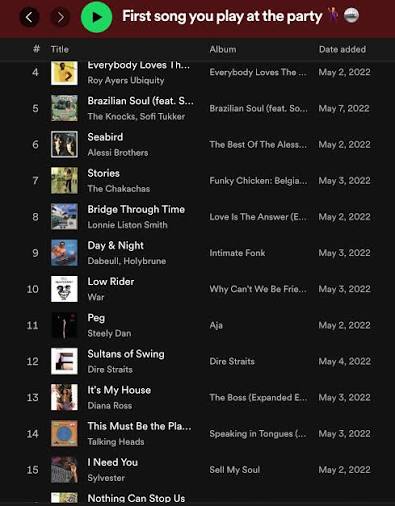
How to Create DJ Playlists Like a Professional DJ
Creating great DJ playlists is one of the most important skills any DJ can learn. A well organised playlist helps you find the right track at the right moment, maintain energy on the dancefloor and perform with confidence.
If you are wondering how to create DJ playlists, the short answer is this:
Group your music by genre, energy level, mood, era and event type. Then organise tracks into logical playlists that help you quickly select the perfect song during a DJ set.
Whether you are a beginner DJ playing your first house party or an experienced wedding DJ performing for hundreds of guests, mastering playlist creation will dramatically improve your DJ performances.
In this guide, you will learn exactly how professional DJs build playlists, organise music libraries and prepare for successful gigs.
Quick Answer: How to Create DJ Playlists
| Step | Action |
|---|---|
| 1 | Collect quality music |
| 2 | Analyse tracks in DJ software |
| 3 | Sort by genre |
| 4 | Sort by BPM |
| 5 | Sort by musical key |
| 6 | Group tracks by energy level |
| 7 | Create playlists for specific events |
| 8 | Build opening, peak time and closing playlists |
| 9 | Test playlists at gigs |
| 10 | Continuously refine and update |
The best DJs do not simply create one giant playlist containing thousands of songs. They create multiple organised playlists that make finding music quick and easy during a performance.
What Is a DJ Playlist?
A DJ playlist is a carefully organised collection of tracks grouped together for a specific purpose.
Unlike a normal music playlist, a DJ playlist is designed to help with live mixing and performance.
Examples include:
- House Music Playlist
- Wedding Party Playlist
- Ibiza Anthems Playlist
- Warm Up Playlist
- Peak Time Playlist
- Closing Set Playlist
- Commercial Dance Playlist
- Drum and Bass Playlist
Professional DJs often maintain hundreds of playlists.
Why DJ Playlists Matter
Many beginner DJs focus entirely on learning technical skills.
However, track selection is what truly makes a great DJ.
A technically perfect mix between two boring tracks will never excite a crowd.
Meanwhile, a simple transition between two incredible songs can create an unforgettable moment.
Good playlists help you:
- Find tracks faster
- Reduce stress during performances
- Improve music selection
- Build smoother DJ sets
- Maintain dancefloor energy
- Prepare for different audiences
- Discover forgotten tracks in your collection
How to Create DJ Playlists Step by Step
Step 1: Build a Quality Music Collection
Before creating playlists, you need music.
Focus on quality rather than quantity.
Many new DJs make the mistake of downloading thousands of tracks they never use.
Instead:
- Buy music you genuinely like
- Download high quality files
- Build slowly
- Learn every track
Quality always beats quantity.
Popular music sources include:
- Beatport
- Traxsource
- BPM Supreme
- DJcity
- ZipDJ
Step 2: Analyse Your Music
Most modern DJ software automatically analyses tracks.
Software such as:
- Rekordbox
- Serato DJ Pro
- Traktor Pro
- VirtualDJ
will detect:
- BPM
- Musical key
- Waveform information
- Track length
This information makes playlist creation significantly easier.
Step 3: Organise by Genre
Genre is usually the first playlist category.
Examples include:
House Music
- Deep House
- Tech House
- Vocal House
- Afro House
Dance Music
- Commercial Dance
- EDM
- Big Room
Urban Music
- Hip Hop
- R&B
- Afrobeats
- Dancehall
Specialist Music
- Drum and Bass
- Garage
- Trance
- Techno
Genre playlists help narrow your choices quickly.
How to Create DJ Playlists by Energy Level
One of the biggest secrets professional DJs use is organising music by energy.
Not all house tracks have the same impact.
Some are suitable for early evening.
Others are designed for peak time.
Low Energy (1–3)
Perfect for:
- Background music
- Early arrivals
- Networking events
Medium Energy (4–6)
Ideal for:
- Building atmosphere
- Getting people moving
High Energy (7–8)
Suitable for:
- Busy dancefloors
- Prime time
Maximum Energy (9–10)
Reserved for:
- Peak moments
- Big singalong records
- Festival anthems
This system allows you to control the mood of a room.
How to Create DJ Playlists for Different Events
Every audience is different.
Wedding DJ Playlists
Create playlists such as:
- Wedding Arrival Music
- Wedding Dinner Music
- First Dance Songs
- Party Classics
- End Of Night Anthems
Club DJ Playlists
Examples include:
- Warm Up Tracks
- Main Room House
- Peak Time Weapons
- Closing Tracks
Mobile DJ Playlists
Create:
- 70s Hits
- 80s Classics
- 90s Dance
- 2000s Anthems
- Current Chart Hits
The more event specific your playlists become, the easier your gigs become.
How to Create DJ Playlists Using BPM
BPM stands for Beats Per Minute.
It measures the speed of a track.
Example BPM Ranges
| Genre | Typical BPM |
|---|---|
| Hip Hop | 70–100 |
| House | 120–128 |
| Tech House | 124–128 |
| Trance | 130–140 |
| Drum and Bass | 170–175 |
Creating BPM playlists helps produce smoother transitions.
Examples:
- House 120–122 BPM
- House 123–125 BPM
- House 126–128 BPM
This method is particularly useful for beginners.
How to Create DJ Playlists Using Musical Key
Harmonic mixing involves mixing tracks in compatible musical keys.
Most DJ software displays key information automatically.
Examples:
- 8A
- 9A
- 10A
- 8B
- 9B
Benefits include:
- Smoother transitions
- Better sounding mixes
- More professional performances
Many DJs create playlists specifically around harmonic mixing opportunities.
Playlist Structures Used by Professional DJs
Professional DJs often divide playlists into performance stages.
Opening Tracks Playlist
Purpose:
- Set the mood
- Avoid overwhelming the audience
Characteristics:
- Lower energy
- Longer introductions
Build Up Playlist
Purpose:
- Increase excitement
Characteristics:
- Recognisable tracks
- Stronger beats
Peak Time Playlist
Purpose:
- Maximum dancefloor impact
Characteristics:
- Biggest records
- Highest energy
Closing Tracks Playlist
Purpose:
- End the night memorably
Characteristics:
- Emotional tracks
- Singalong favourites
DJ Playlist Example Structure
| Playlist | Purpose |
|---|---|
| Warm Up | Start the evening |
| Groove Builders | Increase energy |
| Dancefloor Fillers | Pack the floor |
| Peak Time Bangers | Maximum impact |
| Classics | Familiar songs |
| Closing Anthems | End strongly |
This structure works exceptionally well for weddings, parties and club nights.
Best DJ Software for Playlist Management
| Software | Best For |
|---|---|
| Rekordbox | Pioneer DJ users |
| Serato DJ Pro | Open format DJs |
| Traktor Pro | Creative DJs |
| VirtualDJ | Beginners and mobile DJs |
Each offers:
- Smart playlists
- BPM sorting
- Key sorting
- Genre organisation
- Search functionality
Pros and Cons of Creating Detailed DJ Playlists
Pros
✓ Faster track selection
✓ More confidence
✓ Better organisation
✓ Improved performances
✓ Less stress
✓ Easier preparation
✓ Better crowd reading
Cons
✗ Can become over organised
✗ Requires ongoing maintenance
✗ Takes time initially
✗ Some DJs become too reliant on playlists
Remember that playlists should support creativity, not replace it.
Common DJ Playlist Mistakes
Creating One Huge Playlist
This makes finding tracks difficult.
Instead, create smaller focused playlists.
Ignoring Energy Levels
Genre alone is not enough.
Always consider energy.
Never Updating Playlists
Music changes constantly.
Review playlists regularly.
Using Unlabelled Tracks
Proper track names help enormously during performances.
Copying Other DJs
Build playlists around your own style.
Authenticity is important.
Expert DJ Playlist Tips
Colour Code Your Playlists
Most DJ software allows colour tagging.
Use colours for:
- Energy levels
- Genres
- Event types
Create Emergency Playlists
Keep backup playlists containing:
- Guaranteed dancefloor fillers
- Singalong classics
- Crowd favourites
These can rescue difficult situations.
Use Smart Playlists
Many DJ applications automatically populate playlists based on:
- BPM
- Genre
- Key
- Rating
This saves significant time.
Rate Every Track
Use a five star system.
Example:
★★★★★ Essential track
★★★★ Strong track
★★★ Useful track
★★ Average track
★ Rarely used
This makes selection much easier.
Maintain a Monthly Playlist
Each month:
- Add new music
- Remove weak tracks
- Test new discoveries
This keeps your collection fresh.
Real World DJ Example
Imagine you are DJing a wedding.
Instead of searching through 10,000 songs, you might have:
- Wedding Warm Up
- Wedding Dinner
- Wedding Classics
- Wedding Floor Fillers
- Wedding Singalongs
- Wedding Closing Songs
If guests request a classic party anthem, you immediately know where to find it.
This level of preparation separates amateur DJs from professionals.
Frequently Asked Questions
How many playlists should a DJ have?
There is no fixed number. Many professional DJs maintain dozens or even hundreds of playlists organised by genre, energy, mood and event type.
What is the best way to organise DJ music?
Most DJs organise by genre, BPM, key, energy level and event type.
Should DJs use playlists or freestyle?
The best DJs use both. Playlists provide structure while freestyle track selection keeps sets dynamic.
How often should I update DJ playlists?
Ideally every week or month depending on how frequently you perform.
Should I organise playlists by BPM?
Yes. BPM playlists help create smoother transitions and faster track selection.
Can Rekordbox create smart playlists?
Yes. Rekordbox can automatically create playlists using rules such as genre, BPM and rating.
What are smart playlists?
Smart playlists update automatically based on criteria you choose.
Should wedding DJs have separate playlists?
Absolutely. Weddings require multiple playlists for different stages of the event.
How many songs should be in a DJ playlist?
It depends on the purpose. Many DJs keep playlists between 20 and 100 tracks.
What is the biggest playlist mistake beginners make?
Creating one enormous playlist without organisation.
Should DJs rate tracks?
Yes. Rating tracks helps identify your strongest music quickly.
Is playlist preparation important?
Yes. Preparation reduces stress and improves performance quality.
Can I use Spotify playlists for DJing?
Spotify is useful for discovering music, but most DJ software does not support direct Spotify playback for professional DJ performances.
How do club DJs organise playlists?
Most club DJs use combinations of genre, energy level, key, BPM and event specific folders.
What playlist should I create first?
Start with genre playlists, then add energy level and event specific playlists as your collection grows.
Final Thoughts on How to Create DJ Playlists
Learning how to create DJ playlists is one of the most valuable skills any DJ can develop.
Great playlists allow you to find music quickly, perform confidently and react to the crowd in real time. They help transform a random music collection into a professional DJ library.
Start simple. Organise by genre. Then add BPM, energy levels, musical key and event specific categories. Over time, your playlists will become one of your most powerful DJ tools.
Most importantly, remember that playlists are there to support your creativity, not limit it.
If you want to continue improving your DJ skills, explore more beginner friendly
Want The Complete Roadmap To Become A DJ?
Step by Step to mix, play and launch your DJ journey with confidence.
- Beginner-friendly
- Easy to follow
- Packed with practical tips
 GET YOUR COPY NOW