
What Laptop Do DJs Use?
-
 Jun 28, 2026
 -
 By
Learn How To Be a DJ
By
Learn How To Be a DJ -
 Gear Reviews
 -
 8 min read
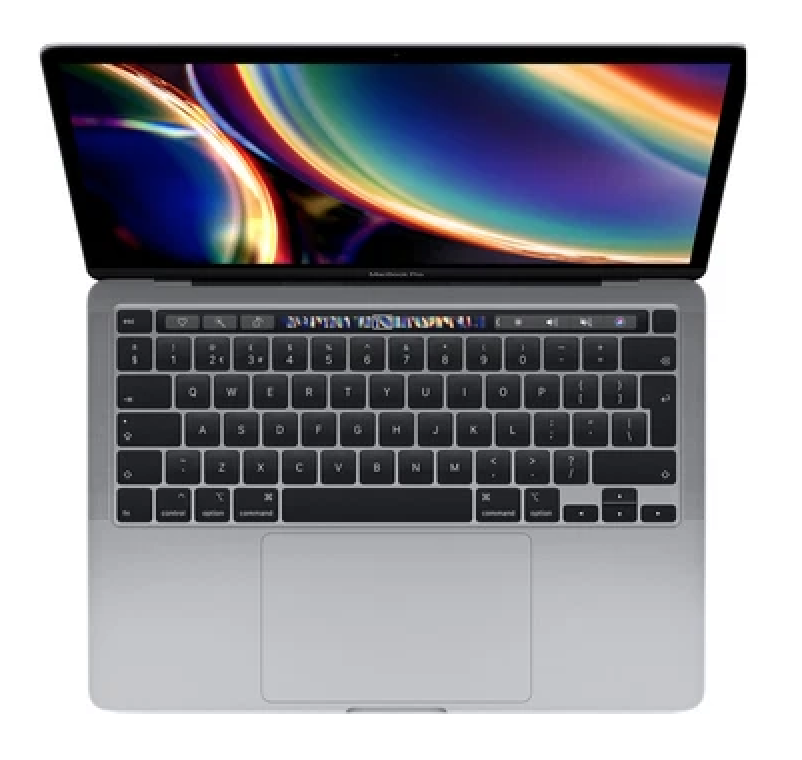
What Laptop Do DJs Use?
If you are just starting your DJ journey, one of the first questions you will probably ask is, what laptop do DJs use?
The good news is that you do not need the most expensive computer on the market to become a great DJ. What matters most is choosing a reliable laptop that works smoothly with your DJ software, stores your music collection safely and performs consistently during long performances.
Whether you are learning at home, playing mobile events, performing at weddings or hoping to play in clubs one day, this guide explains exactly what to look for when buying a DJ laptop.
By the end of this article, you will understand which laptops professional DJs use, the specifications you really need, which models offer the best value and which mistakes to avoid.
Quick Answer
What laptop do DJs use?
Most DJs use either an Apple MacBook or a Windows laptop from brands such as Dell, Lenovo, ASUS, HP or Microsoft.
The ideal DJ laptop should have:
| Feature | Recommended |
|---|---|
| Processor | Intel Core i5 / i7, AMD Ryzen 5 / 7 or Apple M-series |
| RAM | Minimum 16GB |
| Storage | 512GB SSD or larger |
| Screen Size | 13 to 16 inches |
| Battery Life | 8 hours or more |
| USB Ports | Enough for your DJ controller and accessories |
A reliable mid range laptop is usually more important than buying the most expensive model available.
Why DJs Need a Good Laptop
Unlike many other hobbies, DJing relies heavily on stable performance.
Your laptop is responsible for:
- Running DJ software
- Loading music instantly
- Analysing tracks
- Managing playlists
- Recording mixes
- Running lighting software
- Connecting to DJ controllers
- Streaming music if required
If your computer freezes during a performance, the music stops.
That is why experienced DJs always invest in reliability before luxury.
What Laptop Do DJs Use Professionally?
Professional DJs generally fall into two groups.
MacBook Users
Many touring DJs prefer Apple’s MacBook range because of its reliability, long battery life and stable operating system.
Popular choices include:
- MacBook Air M3
- MacBook Air M4
- MacBook Pro 14 inch
- MacBook Pro 16 inch
Advantages include:
- Excellent build quality
- Outstanding battery life
- Quiet operation
- Fast SSD storage
- Long software support
The only downside is the higher purchase price.
Windows Laptop Users
Many successful DJs perform every weekend using Windows laptops.
Popular brands include:
- Dell XPS
- Lenovo ThinkPad
- Lenovo Yoga
- ASUS Zenbook
- ASUS Vivobook
- HP Spectre
- Microsoft Surface Laptop
Modern Windows laptops now offer excellent reliability and outstanding value for money.
Minimum Laptop Specifications for DJing
If you are buying a new laptop today, these are sensible minimum specifications.
| Component | Minimum | Recommended |
| CPU | Intel i5 or Ryzen 5 | Intel i7, Ryzen 7 or Apple M-series |
| RAM | 8GB | 16GB |
| Storage | 256GB SSD | 512GB to 1TB SSD |
| Graphics | Integrated | Integrated is usually sufficient |
| Screen | 13 inch | 14 to 15 inch |
| Operating System | Windows 11 or macOS | Latest version |
Do DJs Need a Powerful Laptop?
Not necessarily.
DJ software is surprisingly efficient.
Programs such as:
- rekordbox
- Serato DJ Pro
- VirtualDJ
- Traktor Pro
- Engine DJ
do not require gaming level hardware.
However, if you also produce music using Ableton Live, Logic Pro, FL Studio or Cubase, investing in a faster processor and additional RAM is worthwhile.
Apple vs Windows for DJing
Apple MacBook
Pros
- Extremely reliable
- Excellent battery life
- Quiet cooling
- Premium build quality
- Great resale value
Cons
- More expensive
- Fewer USB ports
- Repairs can be costly
Windows Laptop
Pros
- Better value
- Huge choice of models
- Easier to upgrade
- More connectivity options
Cons
- Quality varies between manufacturers
- Battery life can differ significantly
Best Laptops for Beginner DJs
If you are learning at home, these laptops offer fantastic value.
| Laptop | Best For |
| MacBook Air M3 | Overall beginner choice |
| ASUS Vivobook | Budget beginners |
| Lenovo IdeaPad | Students |
| Dell Inspiron | Home DJing |
| HP Pavilion | Mobile DJs starting out |
Any of these machines will comfortably run modern DJ software.
Best Laptops for Club DJs
Club DJs often prioritise reliability above everything else.
Popular choices include:
- MacBook Pro
- MacBook Air
- Dell XPS
- Lenovo ThinkPad
- ASUS Zenbook
These machines cope well with demanding environments and long performances.
Best Laptops for Mobile DJs
Mobile DJs often connect:
- DJ controller
- External hard drive
- Microphone interface
- Lighting controller
- DMX software
- External monitor
For this reason, laptops with multiple USB ports are particularly useful.
How Much Storage Does a DJ Need?
Music collections grow quickly.
Approximate storage requirements:
| Music Collection | Recommended SSD |
| Under 5,000 songs | 512GB |
| 5,000 to 20,000 songs | 1TB |
| More than 20,000 songs | 2TB plus external backup |
Solid State Drives are much faster than traditional hard drives.
Always choose SSD storage.
Is 8GB RAM Enough?
Technically yes.
Realistically, no.
Modern DJ software, web browsers and streaming services all consume memory.
For a laptop you hope to keep for several years, 16GB RAM is the sweet spot.
Should DJs Buy Gaming Laptops?
Usually not.
Gaming laptops are:
- Heavier
- Noisier
- Hotter
- Shorter battery life
Unless you also play games or edit high resolution video regularly, a gaming laptop offers little advantage for DJing.
Which DJ Software Works Best?
Most laptops comfortably support:
rekordbox
Perfect for DJs hoping to play in clubs using Pioneer DJ equipment.
Serato DJ Pro
Excellent for controller DJs and scratch DJs.
VirtualDJ
Very beginner friendly with extensive hardware support.
Traktor Pro
Ideal for creative mixing and electronic music.
Engine DJ
Designed for standalone DJ systems from Denon DJ.
Step by Step Guide to Choosing a DJ Laptop
Step 1
Set your budget.
Step 2
Choose between Apple and Windows.
Step 3
Buy at least 16GB RAM.
Step 4
Choose an SSD.
Step 5
Check compatibility with your chosen DJ software.
Step 6
Ensure enough USB ports for your controller.
Step 7
Purchase a protective laptop case.
Accessories Every DJ Should Own
A quality laptop is only part of your setup.
Consider investing in:
- Laptop stand
- USB flash drives
- External SSD backup
- Protective sleeve
- USB hub
- Cable organiser
- Backup charger
- Surge protected extension lead
These inexpensive accessories make performances much smoother.
Common Mistakes Beginners Make
Many new DJs make the same buying errors.
Buying Too Cheap
Very low cost laptops often struggle after only a couple of years.
Buying Too Much Power
You do not need an expensive gaming laptop to mix music.
Ignoring Storage
Music collections grow faster than most beginners expect.
Forgetting Backups
Always keep your music backed up on an external SSD.
Not Checking Software Compatibility
Always confirm your DJ software supports your operating system before updating.
Expert Tips
After many years of DJing, these habits make the biggest difference.
- Restart your laptop before every performance.
- Close unnecessary programs before opening DJ software.
- Disable automatic software updates during gigs.
- Keep your music library organised.
- Back up your music weekly.
- Carry spare USB cables.
- Label all chargers.
- Keep your laptop clean and dust free.
- Never perform without a backup copy of your music.
- Practise using your laptop exactly as you will during live performances.
Reliability is one of the qualities that separates experienced DJs from beginners.
Pros and Cons
Pros
- Stores your entire music library
- Runs powerful DJ software
- Easy to prepare playlists
- Portable
- Can record your mixes
- Suitable for music production
Cons
- Battery eventually wears out
- Requires regular software updates
- Can be expensive
- Needs protection during transport
Frequently Asked Questions
1. What laptop do DJs use the most?
Most professional DJs use either a MacBook Air, MacBook Pro or a high quality Windows laptop from Dell, Lenovo or ASUS.
2. Is a MacBook better for DJing?
Many DJs prefer MacBooks because they are reliable, although modern Windows laptops perform equally well when properly maintained.
3. Can I DJ with an ordinary laptop?
Yes. As long as it meets the minimum specifications and runs compatible DJ software, an ordinary laptop is perfectly suitable.
4. How much RAM should a DJ laptop have?
Sixteen gigabytes is recommended for smooth performance and future proofing.
5. Is 256GB enough storage?
It can be enough initially, but 512GB or more provides much greater flexibility as your music library grows.
6. Do professional DJs use gaming laptops?
Rarely. Most choose lightweight business or creative laptops instead.
7. Can I DJ without a laptop?
Yes. Many standalone DJ systems allow you to perform directly from USB drives, although many beginners still prefer learning with a laptop.
8. Which operating system is better for DJs?
Both macOS and Windows are excellent. The best choice depends on your budget and personal preference.
9. Should I buy a second hand laptop?
Yes, provided it has an SSD, sufficient RAM and good battery health. Buying from a reputable seller with a warranty is recommended.
10. What laptop do DJs use if they also produce music?
Many DJs who also create music choose higher specification machines with faster processors, 16GB or more RAM and at least 1TB SSD storage to comfortably run both DJ and music production software.
Conclusion
So, what laptop do DJs use? The answer is simpler than many beginners expect.
Most DJs use a dependable Apple MacBook or a well specified Windows laptop from a reputable manufacturer. The brand matters less than choosing a machine with enough power, memory and storage to run your chosen DJ software smoothly.
For most aspiring DJs, a laptop with a modern processor, 16GB of RAM and a 512GB SSD offers the ideal balance of performance, reliability and value. Pair it with organised music, regular backups and good maintenance, and it will serve you well for years of practice and live performances.
Remember that your laptop is only one part of becoming a great DJ. Your music selection, mixing skills and ability to entertain a crowd are what truly make the difference.
To continue developing your skills, explore the beginner guides, equipment reviews and practical tutorials available at https://www.learnhowtobeadj.com/ and take the next step towards becoming the DJ you want to be.


You will be redirected to either Amazon or eBay to view and purchase this product. We may get a little kick back for recommending this product to you.
Want The Complete Roadmap To Become A DJ?
Step by Step to mix, play and launch your DJ journey with confidence.
- Beginner-friendly
- Easy to follow
- Packed with practical tips
 GET YOUR COPY NOW