
Best USBs for DJs
-
 Jun 22, 2026
 -
 By
Learn How To Be a DJ
By
Learn How To Be a DJ -
 Gear Reviews
 -
 8 min read
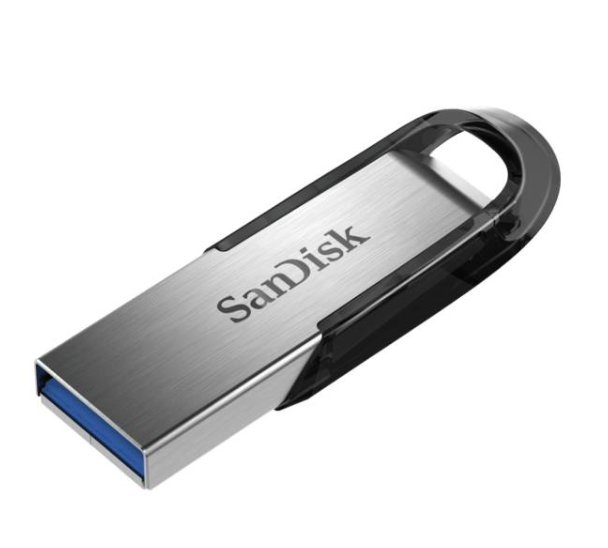
Best USBs for DJs: The 2026 Buying Guide
If you are serious about DJing, choosing one of the best USBs for DJs is just as important as choosing the right headphones, controller or speakers.
A USB drive is often the lifeline of a DJ set. Whether you are playing on Pioneer DJ CDJs, standalone DJ systems, Denon DJ players or simply transporting your music collection between devices, your USB drive needs to be fast, reliable and capable of handling thousands of tracks.
Many beginner DJs spend hundreds or even thousands of pounds on DJ equipment but then use a cheap USB stick that can fail at the worst possible moment.
The reality is simple.
A poor quality USB can cause slow loading times, missing tracks, corrupted playlists and potentially ruin a performance.
In this guide, you will learn:
• The best USBs for DJs in 2026
• What makes a USB suitable for DJing
• How much storage you really need
• USB formatting requirements
• Common mistakes DJs make
• Professional recommendations based on real world experience
By the end, you will know exactly which USB drive to buy for your DJ setup.
Quick Answer: What Are the Best USBs for DJs?
For most DJs, the best USBs for DJs in 2026 are:
| USB Drive | Best For |
|---|---|
| SanDisk Extreme Pro USB 3.2 | Overall Best |
| Samsung BAR Plus | Durability |
| SanDisk Ultra Luxe | Budget DJs |
| Kingston DataTraveler Max | Fastest Performance |
| Samsung FIT Plus | Compact Design |
| Corsair Flash Survivor Stealth | Rugged Use |
| Kingston Exodia | Beginners |
| SanDisk Extreme Go | Professional DJs |
If you use Pioneer DJ equipment and Rekordbox, the SanDisk Extreme Pro remains one of the most trusted choices among professional DJs worldwide.
What Makes a USB Good for DJing?
Not every USB drive is suitable for DJ use.
When evaluating the best USBs for DJs, consider five key factors.
Speed
Fast read speeds mean:
• Faster track loading
• Faster playlist access
• Faster waveform generation
• Reduced loading delays
Professional DJs should ideally use USB 3.0 or USB 3.2 drives.
Reliability
Reliability is critical.
A failed USB can end a performance instantly.
Look for brands with strong reputations including:
• SanDisk
• Samsung
• Kingston
• Corsair
Avoid unbranded drives from unknown manufacturers.
Storage Capacity
The ideal capacity depends on your music library.
| DJ Type | Recommended Size |
|---|---|
| Beginner DJ | 64GB |
| Hobby DJ | 128GB |
| Mobile DJ | 256GB |
| Wedding DJ | 256GB–512GB |
| Professional Club DJ | 256GB–512GB |
Most DJs find 128GB to be the sweet spot.
Build Quality
DJ USB drives are frequently:
• Inserted and removed
• Carried in bags
• Exposed to heat
• Dropped
Metal-bodied USB drives generally last longer than plastic alternatives.
Compatibility
Always ensure compatibility with:
• Rekordbox
• Engine DJ
• Serato DJ Pro
• Pioneer DJ CDJs
• Pioneer DJ XDJ systems
• Denon DJ players
Best USBs for DJs Compared
1. SanDisk Extreme Pro USB 3.2
Why It Is One of the Best USBs for DJs
This USB has become almost legendary among professional DJs.
It offers exceptional speed and reliability.
Pros
• Extremely fast
• Metal construction
• Highly reliable
• Excellent reputation
Cons
• More expensive than budget options
Best For
Professional DJs and frequent performers.
2. Samsung BAR Plus
Best USB for Durability
The Samsung BAR Plus features a strong metal body and waterproof design.
Many DJs appreciate its rugged construction.
Pros
• Waterproof
• Shock resistant
• Premium design
• Reliable brand
Cons
• Slightly slower than Extreme Pro
Best For
Mobile DJs and travelling DJs.
3. SanDisk Ultra Luxe
Best Budget USB for DJs
For DJs on a budget, this offers excellent value.
Pros
• Affordable
• Metal body
• Good speed
Cons
• Not as fast as premium models
Best For
Beginner DJs.
4. Kingston DataTraveler Max
Fastest USB for DJs
Speed enthusiasts love this drive.
It is among the fastest flash drives available.
Pros
• Incredible transfer speeds
• Excellent performance
Cons
• Higher cost
Best For
Large music libraries.
5. Samsung FIT Plus
Best Compact USB
This tiny USB drive barely protrudes from equipment.
Pros
• Compact
• Reliable
• Good speed
Cons
• Easy to misplace
Best For
Portable DJ setups.
6. Corsair Flash Survivor Stealth
Best Rugged USB
Built for extreme environments.
Pros
• Durable
• Water resistant
• Military-style construction
Cons
• Bulky
Best For
Outdoor events.
7. Kingston Exodia
Best Beginner USB
An affordable starting point.
Pros
• Low cost
• Widely available
Cons
• Basic build quality
Best For
Learning DJing.
8. SanDisk Extreme Go
Best Professional Backup USB
Many experienced DJs carry one as a secondary drive.
Pros
• Fast
• Compact
• Reliable
Cons
• Premium pricing
Best For
Backup use.
Why Professional DJs Carry Two USB Drives
One of the biggest lessons you learn after years of DJing is this:
Never rely on a single USB.
Professional DJs almost always carry:
• Primary USB
• Backup USB
Both should contain identical playlists and music.
If one fails, the show continues.
This simple habit can save an entire performance.
How Much Music Fits on a DJ USB?
Approximate capacities:
| Storage | Number of Tracks |
|---|---|
| 64GB | 4,000 to 6,000 |
| 128GB | 8,000 to 12,000 |
| 256GB | 16,000 to 24,000 |
| 512GB | 32,000+ |
This assumes high quality MP3 files.
FLAC and WAV files will require significantly more storage.
What USB Format Should DJs Use?
For most Pioneer DJ equipment:
FAT32
Recommended for maximum compatibility.
Benefits
• Works with most CDJs
• Works with older players
• Widely supported
exFAT
Increasingly supported by modern equipment.
Benefits
• Supports larger files
• Better for larger drives
Drawback
Some older players may not recognise it.
Always check your equipment specifications.
Step-by-Step: How to Prepare a USB for DJing
Step 1
Choose a quality USB drive.
Step 2
Format the drive correctly.
Usually FAT32.
Step 3
Install Rekordbox.
Step 4
Import your music.
Step 5
Create playlists.
Step 6
Analyse tracks.
Step 7
Export to USB.
Step 8
Test your USB before a performance.
Never assume it will work.
Always test.
Common Mistakes DJs Make
Buying the Cheapest USB Available
Cheap drives often fail sooner.
Using Only One USB
Always carry a backup.
Not Testing Before a Gig
Test every export.
Ignoring File Organisation
Messy playlists create stress during performances.
Overfilling the Drive
Leave some free space for optimal performance.
Pros and Cons of USB DJing
Pros
• Portable
• Reliable
• Works with club equipment
• No laptop required
• Easy backup
• Professional workflow
Cons
• Can be lost
• Can fail
• Requires preparation
• Some compatibility issues
Expert Tips from Years of DJ Experience
Label Your USBs
Use clear labels.
Especially in dark DJ booths.
Keep Identical Backups
Every professional DJ should carry duplicates.
Update Playlists Weekly
Fresh music keeps sets exciting.
Avoid Unknown Brands
Stick with trusted manufacturers.
Keep Emergency Tracks
Store crowd-pleasers and backup tracks in a dedicated folder.
Which USB Do Most Professional DJs Use?
Many professional DJs using Pioneer DJ equipment prefer:
• SanDisk Extreme Pro
• Samsung BAR Plus
• SanDisk Extreme Go
These drives have developed strong reputations through years of use in clubs, festivals and mobile events.
Reliability matters more than saving a few pounds.
Frequently Asked Questions
What is the best USB for DJs?
The SanDisk Extreme Pro USB 3.2 is widely considered one of the best USBs for DJs due to its speed and reliability.
How much storage do DJs need?
Most DJs are well served by 128GB or 256GB drives.
Should DJs use USB 3.0 or USB 3.2?
USB 3.2 provides faster speeds, although USB 3.0 remains perfectly usable.
Do DJs use SSDs instead of USB drives?
Some do, especially for large libraries, but USB drives remain the industry standard.
Can I use any USB stick for DJing?
Technically yes, but quality and reliability vary greatly.
What format should my DJ USB be?
FAT32 is the safest option for maximum compatibility.
How many USB drives should I carry?
At least two identical copies.
Are metal USB drives better?
Generally yes. They are more durable and often last longer.
Can CDJs read exFAT?
Many modern models can, but older models may not.
What happens if my USB fails during a set?
Without a backup, your performance may be interrupted.
Is 64GB enough for DJing?
Yes for beginners, but many DJs eventually upgrade.
Can Rekordbox export directly to USB?
Yes. Rekordbox is designed specifically for this workflow.
Should I use WAV or MP3 files?
Both work. WAV provides higher quality but uses more storage.
Can I use one USB across multiple DJ systems?
Usually yes if formatted correctly.
Which USB is best for club DJs?
The SanDisk Extreme Pro remains one of the strongest choices.
Conclusion
Choosing one of the best USBs for DJs may seem like a small decision, but it can have a huge impact on your performances.
A reliable USB drive helps you load tracks quickly, organise playlists efficiently and perform with confidence. Whether you are preparing for your first house party, a wedding reception or a packed nightclub, investing in a quality USB is one of the smartest upgrades you can make.
For most DJs, the SanDisk Extreme Pro strikes the perfect balance between speed, reliability and durability. However, every option in this guide can serve you well depending on your budget and needs.
Most importantly, remember to carry a backup USB and test everything before your gig.
Your future self will thank you.
To continue developing your DJ skills, explore more beginner guides, equipment reviews and professional DJ tips at:


You will be redirected to either Amazon or eBay to view and purchase this product. We may get a little kick back for recommending this product to you. As an eBay Partner, I may be compensated if you make a purchase
Want The Complete Roadmap To Become A DJ?
Step by Step to mix, play and launch your DJ journey with confidence.
- Beginner-friendly
- Easy to follow
- Packed with practical tips
 GET YOUR COPY NOW